
This is modified tabbed extension for well known urxvt-unicode terminal emulator
Features
Possibility to add named tabs, through the X resources, which represents its class. Without any configuration only simple shell class is available under CTRL+SHIFT+N shortcut. After creating first custom shell this default will be discarded.
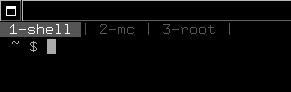
Shortcuts can be attached to Super_L and Super_R keys together with others
Fast navigation to first ten tabs (if available) with shortcut CTRL+[num], where num can be 0 to 9. CTRL+0 will switch to tenth tab.
Numbers in tabs can be switched off in by setting resource:URxvt.tabbed.tab-numbers: false
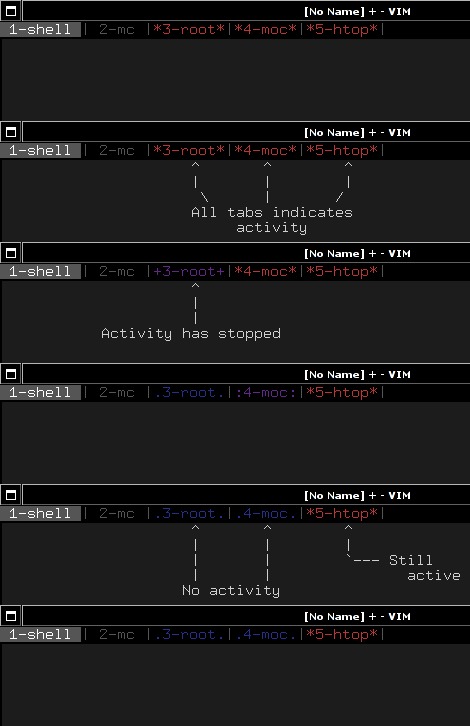
Integrated activity indicator with additional features like colors and different characters instead of simply asterisk depending on time.
Integrated tab renaming from stepb. Default under SHIFT+UP, then type some text and RETURN for accept, ESC for cancel.


Installation
Copy tabbed into ~/.urxvt/ext directory.
Add these to your ~/.Xdefaults:
! Perl extension config
URxvt.perl-ext: tabbed
And that's it. On some systems, there might be a need to reload X resources:
$ xrdb ~/.XdefaultsConfigure
There are several additional things you can set contrary to the original tabbed extension.
Colors
You can change all of the colors regarding tabs appearance. Here are defaults:
URxvt.tabbed.tabbar-fg: 15
URxvt.tabbed.tabbar-bg: 8
URxvt.tabbed.tab-fg: 8
URxvt.tabbed.tab-bg: 0
URxvt.tabbed.active-fg: 1
URxvt.tabbed.actives-fg: 5
URxvt.tabbed.actived-fg: 4
Tab activity
Tabs can change colors depending on the activity of terminal under certain tab. Colors can be defined as described in section above. You can change the time for either group of activity:
URxvt.tabbed.tabbar-timeouts: 16:.:8:::4:+
The value can should be read as colon separated fields. In this case it would be read as:
16 with symbol .
8 with symbol :
4 with symbol +
Numeric values means amount of seconds, on which three group of activity will be triggered. Those group are:
Inactive for at least 16 seconds
Inactive for at least 8 seconds
Inactive for at least 4 seconds
Activity of the tab is always represented by asterisk sign (*).
You can change those values but bear in mind, that first group should have timeout in seconds set higher, than middle one. You can also change symbols for those groups.
Tab numbers
You can turn off tab numbers and leave only name of the tab. Handy to save the space:
URxvt.tabbed.tab-numbers: false
Creating custom classes
Let's assume, that one want to add three kind of custom shells:
simple one (default shell in the system),
midnight commander,
root (namely - su command)
Three resources should be created in .Xdefaults:
URxvt.tabbed.tabcmds.1: N|shell
URxvt.tabbed.tabcmds.2: R|root|su -
URxvt.tabbed.tabcmds.3: M|mc|mc
Numbered attribute just after URxvt.tabbed.tabcmds resource is an ordinal number, started from 1. There shouldn't be gaps between numbers, otherwise custom shells defined after a gap will not work.
Resource values are pipe separated values, which are in order:
shortcut key, which will be used for invoking custom shell together with CTRL+SHIFT keys.
Note: There is limitation for characters used as a shortcut. Because some of them are used for control terminal itself (i.e. CTRL+SHIFT+D may not work), and also other characters (digits, some special characters etc.). Letters are case insensitive.
name of the tab, it could be anything but the pipe.
optional command. If omitted, simple shell will be launched.
Startup tabs
There is possibility to tell tabbed which tabs should be auto started during first window launch. First, you'll need to have some custom tab commands. Let's assume, that there are already defined three custom shells, like in section above. If one wanted to start shell, mc and root session, following line should be placed in ~/.Xdefaults:
URxvt.tabbed.session: N|M|R
Renaming tabs
On runtime, tabs can be renamed using SHIFT+UP - now you can type name for the tab. Return accept change, ESC cancels it. This feature was taken from stepb tabbedx repository.