 gryf
2fbe3c59e5
gryf
2fbe3c59e5
For now 'wmgeneral' was used for accessing common dockapps functions.
Those functions was extracted to the library called libdockapp[1]. This
patch removes wmgeneral directory and make use of libdockapp library.

[1] http://www.dockapps.net/libdockapp
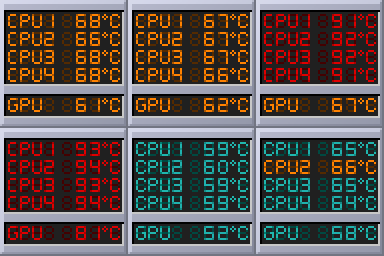
This is dead simple Window Maker app for monitoring CPU and GPU temperature. Based on WMTempMon dockapp, although it was heavily reworked.
Compile
To build the dockapp, you'll need `libdockap`_ it should be available in your package repository. While you have it installed, perform the commands:
$ cd wmtemp
$ make
$ sudo make install
Binary will be installed in /usr/local/bin directory.
Configuration
To use the dockapp, you'll need to prepare configuration file, otherwise you'll see 0 values for every core/gpu.
Wmtemp will look for configuration file in home directory. Here is sample content of such file:
$ cat ~/.wmtemp
# wmtemp conf file

cpu1_path = /sys/devices/platform/coretemp.0/hwmon/hwmon2/temp2_input
cpu1_critical = 80
cpu1_warning = 65
cpu2_path = /sys/devices/platform/coretemp.0/hwmon/hwmon2/temp3_input
cpu2_critical = 80
cpu2_warning = 65
cpu3_path = /sys/devices/platform/coretemp.0/hwmon/hwmon2/temp4_input
cpu3_critical = 80
cpu3_warning = 65
cpu4_path = /sys/devices/platform/coretemp.0/hwmon/hwmon2/temp5_input
cpu4_critical = 80
cpu4_warning = 65
gpu_path = /sys/devices/virtual/hwmon/hwmon1/temp4_input
gpu_critical = 70
gpu_warning = 60
Every core have three options to change:
[core]_path - path to temperature file to read from. The content of such file contains a number of temperature in mili-Celsius.
[core]_critical - temperature in °C, on which (and beyond) red color would be used for highlight the entry.
[core]_warning - temperature in °C, on which (and beyond) orange color would be used for highlight the entry.
In main directory there is a wmtemp_sample file, which can be copied to ~/.wmtemp and tweaked according to the needs and hardware.
Licence
This software is licensed under GPL2 license. See COPYING file for details.